How to Find the Email Address of Your edjufy Account
When your school invites you to use edjufy, the email address stored in the official school administration is usually used. Alternatively, the school uses another email address known to them to send the invitation to your edjufy account.
To log in to your edjufy account, you need the email address you used during registration.
If you no longer know it, you can find it in an email sent by edjufy.
For users with Google Mail (Gmail) email addresses, there is often confusion about the spelling of the email address. For example, a dot in a Google Mail (Gmail) email address does not matter. (More information about this can be found here.) Additionally, Google offers different endings such as @gmail.com, @googlemail.com, or @googlemail.de.
For edjufy, the exact spelling of the email address stored for the edjufy account is important.
Otherwise, our system cannot match your email address and you cannot log in to your edjufy account.
How to Find the Email Address of Your edjufy Account in an Email from edjufy
Open your email program and search for an email from edjufy, e.g., a parent letter or the email invitation to use edjufy.
Now scroll to the bottom of the email to the footer area.
There you will find in the info text after "You are receiving this email (sent to [email]) on behalf of your school [...]" the email address stored for your edjufy account.
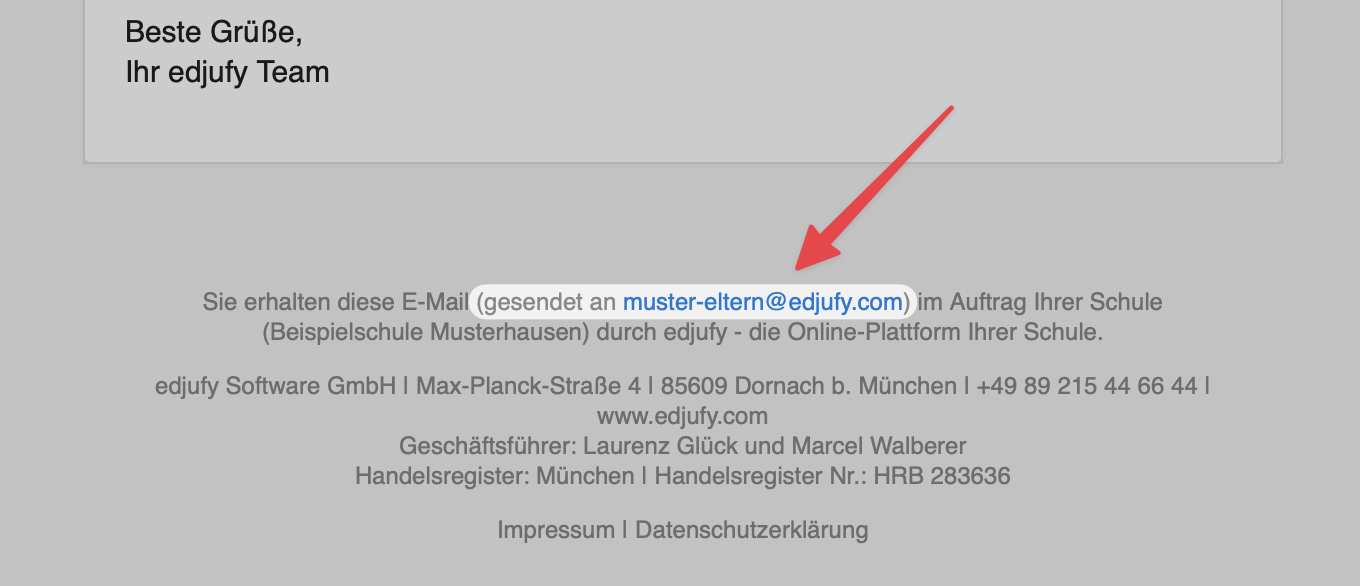
Now use this email address to log in to your edjufy account.
If you still need help finding your email address, please contact your school directly. They can tell you the email address stored for your edjufy account.